NXP Semiconductor is asking for video entries in a promotion for it's I2C chips. Tell them what you would like to do with the NXP I2C demonstration board and you could win one. There are no videos available yet, but this page will have a gallery of the best entries. This isn't a general purpose development board, and the retail value is only about $40, but might be worth looking at if you plan on using I2C. Also, be aware that the PC software to interface with the board is a little old, and support is only listed for windows OSes up to XP.
If you don't want to upload a video, you might still be interested in a free I2C sample kit. They have kits available for industrial, portable, or computing applications. For portable applications they list gaming and are promoting Fast-mode Plus (Fm+) I2C-bus technology which is compatible with NXP cortex-M0 ARM processors.
Monday, March 14, 2011


Thursday, February 17, 2011
Intel Atom Development Kit Givaway
Intel is giving away limited quantities of its new Atom processor embedded development board valued at over $650. You must apply to the Intel® Embedded Seed Board Program and sign an NDA if your design is accepted.

The Kit contains and Atom E640 SOC at 1GHz on a Nano-ITX board with 1GB DDR2, GigE, SATA, USB and PCI Express. You also get the Wind River Embedded Development Kit.
Sunday, February 13, 2011
Git for Windows and Emacs Part 2
I like to have the text and bin utils available when editing in GNU Emacs on windows. That will allow me to use ediff, directory compare, and grep without any problems. I used to install GnuWin32 for this purpose, but I found that the windows version of Git, mysysgit, will provide all the necessary commands. If I am doing Git commits or other work I still do that outside of emacs in the git shell (see Part 1).
On windows, to use mysysgit with emacs, I start up emacs with a shortcut that runs a bat file. Here are the contents of one I named 'gitemacs.bat' that sets the path and starts emacs:
PATH=c:/ac/emacs-23.2/bin;%PATH%
C:\WINDOWS\system32\cmd.exe /c ""C:\Program Files\Git\bin\sh.exe" --login -i -t -c runemacs.exe"
KNOWN ISSUE: When I try to run make with a cross compiler from within Emacs with compile-command, I get this an error:
/usr/bin/sh: -c: line 1: syntax error: unexpected end of file
TODO: Improve git command usage from within Emacs possibly by using git.el and git-mswin.el
On windows, to use mysysgit with emacs, I start up emacs with a shortcut that runs a bat file. Here are the contents of one I named 'gitemacs.bat' that sets the path and starts emacs:
PATH=c:/ac/emacs-23.2/bin;%PATH%
C:\WINDOWS\system32\cmd.exe /c ""C:\Program Files\Git\bin\sh.exe" --login -i -t -c runemacs.exe"
KNOWN ISSUE: When I try to run make with a cross compiler from within Emacs with compile-command, I get this an error:
/usr/bin/sh: -c: line 1: syntax error: unexpected end of file
TODO: Improve git command usage from within Emacs possibly by using git.el and git-mswin.el
Friday, February 11, 2011
Google Honors Edison With Doodle and Datacenters
If you visit Google today you will see a doodle commemorating Thomas Edison's 164th Birthday. I found this short bio of Edison and his invention factory from RadioElectronics.com a little more readable than Edison's Wikipedia entry.

It is interesting that the DC power distribution that Edison advocated is now making inroads in data centers to save energy. This IEEE Spectrum article, 'Direct Current Networks Gain Ground,' has the alternate title 'Edison Vindicated' in the print version of the magazine. Google utilizes DC power in its 'Manhatten Project' data center design revealing this big energy saving secret in 2009. It will be very interesting to see what affect a DC power network will have on embedded system designs It has the potential to make consumer electronic devices cheaper and easier to use, eliminating the need for manufacturers to provide, and for consumers to carry around, a wall wart or black brick power supply.
Saturday, February 5, 2011
Easily Add a Graphical Meter to Your Embedded Sensor Project
Lascar Electronics recently was awarded an Electronic Products 2010 product of the year award for its PanelPilot platform. PanelPilot is a graphical software development tool to create custom meters. Lascar also sells a line of compatible LCD displays. Currently, two models are available, a 2.4" and a 2.8", either can be purchased online for under $100.

The displays can monitor real-time data using interfaces on the back. One allows direct monitoring of voltage using four screw terminal jacks. A USB interface to a PC allows programming your custom graphical meter you created with PanelPilot. I2C and SPI interfaces are available for controlling the meter from an embedded system, although this feature isn't yet supported by the development software. Even without a serial interface, you could use an analog output from a development board like the Arduino or BeagleBoard. This would give you an attractive real-time indicator without writing a lot of software or building your own display hardware.

The displays can monitor real-time data using interfaces on the back. One allows direct monitoring of voltage using four screw terminal jacks. A USB interface to a PC allows programming your custom graphical meter you created with PanelPilot. I2C and SPI interfaces are available for controlling the meter from an embedded system, although this feature isn't yet supported by the development software. Even without a serial interface, you could use an analog output from a development board like the Arduino or BeagleBoard. This would give you an attractive real-time indicator without writing a lot of software or building your own display hardware.
Friday, February 4, 2011
Emacs for Windows
For software development, my preferred text editor is Emacs. On windows, I use a port of Emacs that you can find here in the GNU Emacs for Windows FAQ.
Here are the steps for a basic set up of Emacs on Windows with syntax highlighting.
2. Download color-theme and put the unzipped files in your site-lisp directory. Follow the examples on this emacs wiki page to set your default color theme for syntax highlighting. I like the 'billw' theme. After you get this working, you can byte compile the color-theme.el file if it seems a little slow loading.
Now that you have Emacs installed, you will probably want to configure some Unix utilities for Windows as well. Here is how I set up Git for windows with an Emacs-like editor for commit messages.
Here are the steps for a basic set up of Emacs on Windows with syntax highlighting.
1. Install emacs, you can download the windows binary here. There is a README with more information on the different version you can download. For detailed installation instructions you can read this chapter of the FAQ. I just unzip the emacs-xx.x-bin-386.zip to a local folder and set up a windows shortcut to runemacs.exe that will start the program in my work directory. I also make an environment variable named HOME and set it to the path where I will keep my .emacs file.
2. Download color-theme and put the unzipped files in your site-lisp directory. Follow the examples on this emacs wiki page to set your default color theme for syntax highlighting. I like the 'billw' theme. After you get this working, you can byte compile the color-theme.el file if it seems a little slow loading.
Now that you have Emacs installed, you will probably want to configure some Unix utilities for Windows as well. Here is how I set up Git for windows with an Emacs-like editor for commit messages.
Git for Windows and Emacs
If you are developing source code on Windows with Emacs and you want to use Git to track your changes, I have found a nice setup using Git for Windows (formerly named msysgit) with NanoEmacs. If you don't have Emacs installed, here is another post with the basic steps to get you started.
Here are the steps to set up Git to run in a bash shell with an Emacs compatible editor for commit messages.
1. Download and install Git for Windows. It will prompt you about line endings. I do not use the automatic line feed conversion, there are reports of problems and I can control it fine within Emacs (here is a link to some Emacs line ending commands). If you aren't sure about this choice, you can change it after installation at the git command line using 'git config.'
2. After installation, enter some essential configuration settings in the Git command shell.
$ git config --global auto.crlf false
Update: on newer versions this setting has changed
$ git config --global core.autocrlf false
Change a few other defaults that you might need
$ git config --global user.name "Your Name"
4. Copy NanoEmacs executlable, ne32.exe, to a directory in your path. I have a bin directory under my home directory for small utility programs.
5. Configure NanoEmacs as the default editor for Git. Substitute the an executable path for /c/ac/bin
Updated on Nov 22, 2016 with new crlf setting and new link to Git for Windows.
Here are the steps to set up Git to run in a bash shell with an Emacs compatible editor for commit messages.
1. Download and install Git for Windows. It will prompt you about line endings. I do not use the automatic line feed conversion, there are reports of problems and I can control it fine within Emacs (here is a link to some Emacs line ending commands). If you aren't sure about this choice, you can change it after installation at the git command line using 'git config.'
2. After installation, enter some essential configuration settings in the Git command shell.
$ git config --global auto.crlf false
Update: on newer versions this setting has changed
$ git config --global core.autocrlf false
Change a few other defaults that you might need
$ git config --global user.name "Your Name"
$ git config --global user.email yourname@yourdomain.com
3. I wanted a small emacs compatible editor for commit messages. I found Jasspa's NanoEmacs console version. Download the latest, at the time of writing it's jasspa-ne-ms-win32-20091011.zip. You will also need this ne.emf file. The Download page has a few more versions, extras, and manuals.
3. I wanted a small emacs compatible editor for commit messages. I found Jasspa's NanoEmacs console version. Download the latest, at the time of writing it's jasspa-ne-ms-win32-20091011.zip. You will also need this ne.emf file. The Download page has a few more versions, extras, and manuals.
4. Copy NanoEmacs executlable, ne32.exe, to a directory in your path. I have a bin directory under my home directory for small utility programs.
5. Configure NanoEmacs as the default editor for Git. Substitute the an executable path for /c/ac/bin
$ git config --global core.editor /c/ac/bin/ne32.exe
Updated on Nov 22, 2016 with new crlf setting and new link to Git for Windows.
Tuesday, January 25, 2011
TI Floating Point Evaluation Board Promotion - $11
The first 1000 orders of the TI F28069 Piccolo controlSTICK - TMDX28069USB are only $11 with the promo code 'Piccolo11' at the TI eStore.
Tuesday, January 18, 2011
Cypress Extends Deadline for ARM Contest
The ARM Cortex-M3 PSoC 5 Design Challenge will accept new entries until January 24, 2011. Cypress will give away 100 development kits and a number of cash prizes over the three rounds of the contest. The grand prize is $2500 with additional category and community prizes available.
Wednesday, January 12, 2011
Breakout Boards for Electronics Debug and Prototypes
If you need to wire up a prototype, create a custom debug cable, or connect a logic analyzer to communications link, breakout boards are a real time saver. I have used SchmartBoards' JTAG board in the past, another supplier I came across is Winford Engineering. They have breakout boards for USB, modular jacks, 0.1" headers and DB connectors.


Using boards like these, you can quickly build almost any prototype for development or debug purposes. For the processor and memory, you can use a development board from the processor manufacturer. There are hundreds of development boards available for various processors. For some examples, here is a list of low cost demo boards from Microchip, here are boards from Cypress, a list of Blackfin boards from Analog Devices and development kits and boards from Texas Instruments. I used a PICkit 2 28-Pin demo board with an RF module for a recent project.


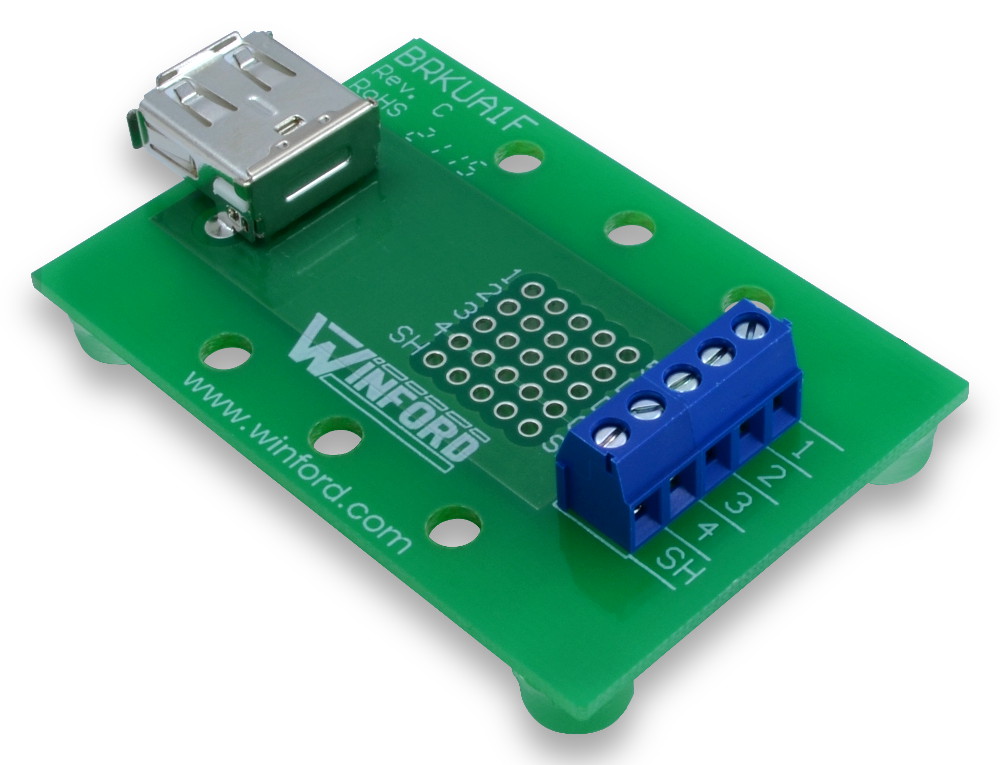

If you can't find a development board configured correctly, SchmartBoards will support hand soldering many common chip formats, including SMT devices, and even BGAs. If you aren't confident you can hand solder a component yourself, SchmartBoards will solder your IC for you for a $3.00 charge.
Subscribe to:
Posts (Atom)


