Friday, February 4, 2011

Git for Windows and Emacs

If you are developing source code on Windows with Emacs and you want to use Git to track your changes, I have found a nice setup using Git for Windows  (formerly named msysgit) with NanoEmacs.  If you don't have Emacs installed, here is another post with the basic steps to get you started.

Here are the steps to set up Git to run in a bash shell with an Emacs compatible editor for commit messages.

1. Download and install Git for Windows.  It will prompt you about line endings.  I do not use the automatic line feed conversion, there are reports of problems and I can control it fine within Emacs (here is a link to some Emacs line ending commands).  If you aren't sure about this choice, you can change it after installation at the git command line using 'git config.'

2. After installation, enter some essential configuration settings in the Git command shell.
$ git config --global auto.crlf false
Update: on newer versions this setting has changed
$ git config --global core.autocrlf false

Change a few other defaults that you might need
$ git config --global user.name "Your Name"
$ git config --global user.email yourname@yourdomain.com

3.  I wanted a small emacs compatible editor for commit messages.  I found Jasspa's NanoEmacs console version.  Download the latest, at the time of writing it's jasspa-ne-ms-win32-20091011.zip. You will also need this ne.emf file.  The Download page has a few more versions, extras, and manuals.

4. Copy NanoEmacs executlable, ne32.exe, to a directory in your path.   I have a bin directory under my home directory for small utility programs.

5. Configure NanoEmacs as the default editor for Git.  Substitute the an executable path for /c/ac/bin
$ git config --global core.editor /c/ac/bin/ne32.exe

Updated on Nov 22, 2016 with new crlf setting and new link to Git for Windows.

Tuesday, January 18, 2011

Cypress Extends Deadline for ARM Contest

The ARM Cortex-M3 PSoC 5 Design Challenge will accept new entries until January 24, 2011.  Cypress will give away 100 development kits and a number of cash prizes over the three rounds of the contest.  The grand prize is $2500 with additional category and community prizes available.

Wednesday, January 12, 2011

Breakout Boards for Electronics Debug and Prototypes

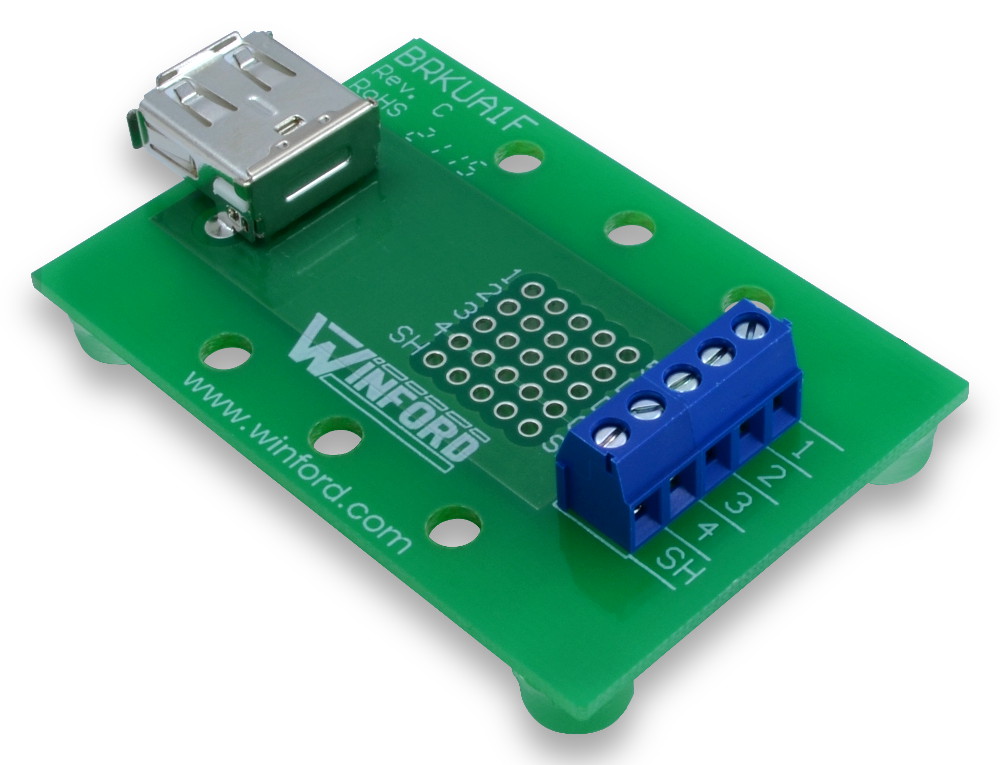
If you need to wire up a prototype, create a custom debug cable, or connect a logic analyzer to communications link, breakout boards are a real time saver. I have used SchmartBoards' JTAG board in the past, another supplier I came across is Winford Engineering.  They have breakout boards for USB, modular jacks, 0.1" headers and DB connectors.


Using boards like these, you can quickly build almost any prototype for development or debug purposes. For the processor and memory, you can use a development board from the processor manufacturer.  There are hundreds of development boards available for various processors.  For some examples, here is a list of low cost demo boards from Microchip, here are boards from Cypress, a list of Blackfin boards from Analog Devices and development kits and boards from Texas Instruments. I used a PICkit 2 28-Pin demo board with an RF module for a recent project.

If you can't find a development board configured correctly, SchmartBoards will support hand soldering many common chip formats, including SMT devices, and even BGAs.  If you aren't confident you can hand solder a component yourself, SchmartBoards will solder your IC for you for a $3.00 charge.


Monday, January 3, 2011

Microchip's new IDE available in beta

Microchip has released a beta of MPLAB® X Integrated Development Environment to replace the Windows-only MPLAB 8.  MPLAB X was developed using NetBeans and the redesign was a major effort by the Microchip developers.  The new development tool will run on Windows, Linux, and MAC operating systems, giving users the same interface and functionality across platforms.

Monday, October 4, 2010

Microsemi On Embedded Buying Spree, Aquires Actel

Microsemi announced its acquisition of Actel today, the latest in a series of embedded buys.  Microsemi's growth is creating a new leader in high-end embedded markets including military, wireless, and mobile phones. See the press release for the Actel acquisition for more details.

Other recent acquisitions include mobile wireless and security chip companies.  Last month it was VT Silicon and Arxan Defense Systems, earlier in the year it was White Electronic Designs.

Tuesday, September 21, 2010

STMicroelectronics Offers Low Cost ARM Cortex M3 Kit

The price war continues among microcontroller development kits with the STMicroelectronics STM32 Discovery Kit available worldwide from these major electronics distributors for about $10 US.  It features an ARM Cortex-M3 that is the basis of the STM32 Value line of processors.  It is programmable via USB and you can download development tools and example firmware projects.

See the STM32 Discovery Kit Press Release for more details.

Thursday, September 2, 2010

Actel Giving Away Evaluation Kits For Best SmartFusion Designs

The Actel SmartFusion design contest offers winners a free SmartFusion Evaluation Kit.  To enter you will need to answer questions about how you would utilize all of the features of SmartFusion.  These devices combine an FPGA, programmable analog, and an ARM Cortex-M3.   Your answers must describe  your use of the FPGA, choice of algorithms, OS,  network stack, external signals, and external transducers.


Friday, August 27, 2010

Add USB Host Support To Your MCU Design

The Maxim MAX3421E allows you to add a USB Host port to any microprocessor with an SPI interface.  This IC has recently returned to active production after being listed as not recommended for new designs.  It is offered as an Arduino shield (daughter board) from Circuits@Home and the code library for the USB Host Shield is on github.  You can find many articles on the design and use of the USB shield on the Circuits@Home blog.  The design is open hardware and you can order it from Batch-PCB as well.


For commercial projects, the MAX3421E is supported by USB Stacks from HCC-Embedded and Micro Digital.  HCC-Embedded also has an SD card module to add a USB Host to any board with an SPI capable SD card socket.  The schematics and layout are a free download from the website.

The MAX3421EVKIT-1 from Maxim can also be used for developing a USB stack for individual devices.  It can be ordered directly from Maxim ($57) or from Digikey ($62).  You can start with the MAX3421E EVKIT-1 Software and User Guide to develop your own driver for targeted devices.  I have been working with the MAX3421E with an ARM processor board and have added support for a mouse, keyboard, and hub to the design.